Every vision CNC router on the market claims camera alignment and print-to-cut capability. The differences that actually matter for a signage or advertising shop show up in continuous-duty reliability, not in whether the camera feature exists at all.
An entry-level vision router and a high-speed production model both read registration marks and align a cut to printed artwork — but they’re built for different duty cycles. A shop running a handful of jobs a day has different requirements than one running printed board through the machine continuously for a full shift, and buying the wrong tier for your actual volume either wastes money on unused capacity or under-specifies a machine that can’t keep up.
This guide covers what actually separates a high-speed vision router from an entry-level one: camera alignment reliability, spindle cooling for continuous duty, optional knife capability, material fit and file workflow.
Camera Alignment: The Baseline Capability, Not the Differentiator
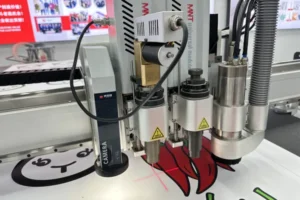
Nearly every vision router on the market offers machine vision camera alignment as a core feature — the real differentiator between models is read reliability under production conditions, not whether the capability exists, so evaluate based on a demonstration under conditions matching your actual print quality and material.
Ask for a demonstration cut on your own printed sample, not the supplier’s ideal test print. A camera system that reads perfectly on a high-contrast demo print may perform differently on your actual UV-printed board with your specific ink and media combination.
Water-Cooled Spindle for Continuous Duty
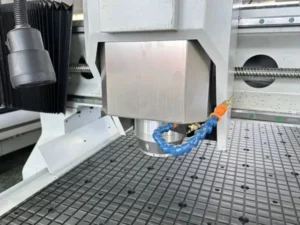
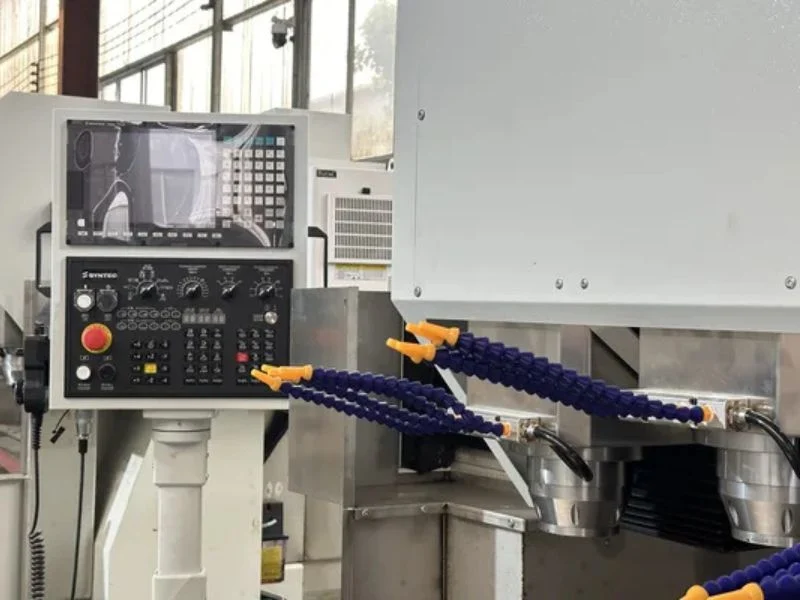
A water-cooled spindle designed for continuous production runs quieter and holds stable temperature better than an air-cooled spindle under sustained use — this matters specifically for shops running the machine through full shifts rather than intermittent short jobs, where an air-cooled spindle’s duty-cycle limitations become a real production constraint.
Ask about the spindle’s rated continuous-duty capability specifically, not just its peak power figure. A spindle that can hit high RPM briefly but needs cool-down periods under sustained load has a different duty cycle rating than one genuinely built for the same production profile as one genuinely rated for continuous operation — and that difference matters more on high-volume signage work than the peak power number does.
Optional Knife Cutting for Soft Material
An optional knife head extends a vision router beyond rigid board into foam board, KT board and other soft or hollow material that a spinning bit compresses or melts rather than cutting cleanly — this matters if your material mix includes both rigid signage substrate and softer POP display or foam-core material.
Confirm whether knife capability is a factory option that integrates with the existing tool-change and camera workflow, or an aftermarket add-on that complicates programming. A well-integrated optional knife head lets one machine and one file workflow cover both material categories; a poorly integrated one effectively means running two different processes on the same machine.
Material Fit: What the Machine Is Actually Built to Run
Confirm the machine’s vacuum table, spindle power and (if equipped) knife capability are matched to your actual material range — rigid ACM and PVC board, foam board, if the shop regularly processes rigid PVC sheet, the router specification should be checked against sheet thickness, vacuum hold-down, and bit selection rather than relying on a general machine spec. And any specialty substrate your shop regularly runs — rather than assuming a general-purpose spec sheet covers everything without gaps.
Signage and advertising material varies widely in thickness, rigidity and surface finish. A machine optimized primarily for thin rigid board may not hold or cut thicker foam-core material as cleanly, and vice versa. Get a test cut on your actual material range, not just the supplier’s standard demonstration substrate.
File Workflow: DXF, PLT and NC Handling
Confirm the machine’s software handles your design-to-production file chain — DXF or PLT files carrying cut paths and registration marks, converted to machine-ready NC files — without a manual conversion step prone to introducing mark-placement errors.
Ask specifically how registration mark position is preserved through the file conversion process, since this is a common, easy-to-overlook source of registration accuracy problems that has nothing to do with the camera hardware itself. See our print-to-cut workflow guide for the full file-to-production chain once the machine is running.
Dust Extraction Sized for Continuous Production
Size dust extraction for continuous, full-shift operation rather than intermittent job-by-job use — a high-speed vision router generating debris continuously needs extraction that keeps pace, since accumulated dust settles onto the camera lens and lighting, directly degrading the registration accuracy the whole machine depends on.
Confirm filter capacity and cleaning interval against your actual production volume, not a general-purpose spec. Extraction that’s adequate for occasional use can fall meaningfully behind on a machine running continuously through a full production shift.
When to Choose a High-Speed Model Over an Entry-Level Vision Router
Choose a high-speed, continuous-duty vision router when your production volume genuinely runs the machine for extended periods without significant idle time; an entry-level vision router remains the right choice for lower-volume shops where continuous-duty spindle cooling and production-grade reliability aren’t the limiting factor.
Run this against your actual daily machine utilization rather than aspirational future volume. A shop running the machine intermittently through the day doesn’t need continuous-duty cooling capability it will rarely stress, while a shop running near-continuous production sees the reliability difference show up directly in reduced downtime and consistent output.
See the full T3 High-Speed Vision CNC Router specifications, or our CNC router maintenance checklist for what keeping one running day to day actually involves.
Frequently Asked Questions
What actually separates a high-speed vision router from an entry-level one?
Continuous-duty spindle cooling reliability, camera read consistency under real production conditions, and extraction sized for sustained operation — not whether the camera capability exists, which most vision routers offer at some level.
Do I need a water-cooled spindle if I only run the machine occasionally?
Not necessarily — continuous-duty cooling matters most for shops running the machine through extended, near-continuous production. Lower-volume, intermittent use puts less strain on spindle cooling capacity.
Is the optional knife head worth adding?
If your material mix includes foam board, KT board or other soft material alongside rigid signage substrate, yes — a spinning bit tends to compress or melt these materials rather than cutting them cleanly.
How should I test camera alignment reliability before buying?
Ask for a demonstration cut on your own printed sample material, not the supplier’s ideal demo print — real-world ink, media and print quality can behave differently than an optimized demonstration.
Does file format matter for print-to-cut accuracy?
Yes — confirm how registration mark position is preserved through DXF/PLT-to-NC file conversion, since this step is a common, overlooked source of registration errors unrelated to camera hardware quality.
How do I size dust extraction for a vision router?
Match extraction capacity to your actual production volume, not a general-purpose spec — accumulated dust on the camera lens and lighting directly degrades registration accuracy, so continuous production needs extraction that keeps pace.