A compact CNC machining center sits in an awkward comparison spot: bigger and more capable than a general-purpose router, smaller and less expensive than a large-format gantry machine. Buyers often size this category by footprint alone, which misses the specs that actually determine whether it handles real production work — load capacity, tool magazine type, and vacuum holding across your material range.
Shops running acrylic, aluminum, plastics, cabinet doors and composite material on the same machine need a compact machining center that handles the full range without being over-specified for the lighter jobs or under-built for the heavier ones. Getting the working area and load capacity match right up front avoids both a machine that’s constantly at its limits and one carrying capability the shop never uses.
This guide covers the decisions that determine whether a compact machining center fits your production: working area, spindle selection, tool magazine capacity, table load, vacuum holding and controller choice.
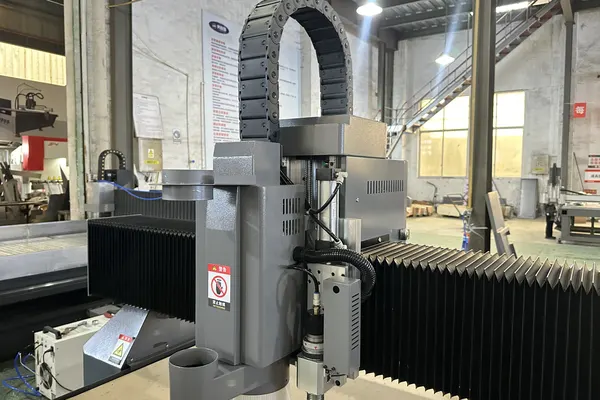
One thing to settle first: a compact machining centre in this class is an industrial CNC router — a gantry over a vacuum bed, cutting sheet and panel material. It is not a metal vertical machining centre, which clamps billet in a vice and cuts steel on a box way. The two share a name and almost nothing else: different hold-down, different spindle speeds, different tolerance targets and a different price class. If you came here for the metal VMC, this is the wrong page and no amount of spec comparison will make it the right one.
Working Area Matched to Your Part Range
Confirm working travel — not nominal bed size — comfortably covers your largest regular part with margin, while staying compact enough that you’re not paying for footprint your actual work never uses. Compact machining centers typically offer working envelopes in the 1500–3200 mm class, which covers most cabinet, sign and precision-parts work without the floor space and cost of a large-format machine.
Some compact platforms offer more than one configuration on the same working-area class — a moving-table version for lighter parts and a moving-gantry version for heavier ones. If your parts vary significantly in weight, check whether your candidate machine offers this flexibility rather than assuming one configuration covers your full range.
Spindle Selection for Your Material Mix
Match spindle power to your heaviest or most demanding material — dense hardwood, aluminum, composite panel — rather than your average job, since a spindle sized only for lighter material will bog down or produce poor edge finish on denser work even if it handles typical jobs comfortably.
Water-cooled spindles generally handle sustained heavy cutting better than air-cooled ones and run quieter under load, at the cost of a cooling system to maintain. For shops running mostly lighter material with occasional heavier jobs, air-cooled is often sufficient; shops running dense material regularly see a clearer case for water cooling.
Tool Magazine Capacity and Type
Count your actual tool rotation — profiling bit, drill, engraving tool, chamfer bit — before specifying magazine size, and confirm whether your candidate machine uses a linear or disc-type changer, since disc-type magazines typically handle a broader tool rotation in a similar footprint.
An oversized magazine sitting mostly empty adds cost without adding capability your actual job list uses. A four-to-eight position magazine covers most compact machining center applications; larger magazines matter more for shops running genuinely complex multi-operation parts as routine work.
Table Load Capacity: The Spec Most Buyers Underweight
Check the table’s rated load capacity against your actual part weight, not just its working area — a compact machining center’s defining advantage over a general router is often load capacity, and undersizing this spec means the machine can’t handle exactly the parts it was bought for.
Load capacity varies significantly between configurations even within the same working-area class — some compact platforms offer both a lighter-duty moving-table configuration and a heavier-duty moving-gantry configuration built specifically for parts up to several tonnes. If your parts are heavy castings, forgings, or dense tooling blocks, confirm the specific configuration you’re quoted actually carries that load rating.
Vacuum Holding Across Material Types
Confirm zoned vacuum holding works reliably across your full material range — thin acrylic sheet, rigid composite panel, cabinet door blanks — since a vacuum system tuned for one material extreme doesn’t automatically hold the others equally well.
Independently switched vacuum zones let the machine concentrate suction where material actually sits on a given job, rather than wasting pump capacity on unused table area. Ask about zone count and pump sizing against your densest expected layout, not a simplified single-material demonstration.
Controller Choice for Production Workflow
Evaluate the controller’s day-to-day workflow — job queuing, tool offset management, ease of running repeat jobs — alongside its technical specifications, since a capable but cumbersome controller adds friction to every job a production shop runs.
Ask for a hands-on demonstration of a typical job from file load through completed cut, not just a features walkthrough, and confirm the controller integrates cleanly with your existing CAM software.
What to Bring to an RFQ Conversation
Come to a quote conversation with your actual heaviest part weight, largest regular part dimensions, and full material list rather than a general description of “cabinet doors and acrylic” — suppliers can only match load capacity, working area and spindle configuration accurately against specific numbers, not general categories.
If your part mix includes occasional outliers — an unusually heavy or oversized job that comes up rarely — mention that separately from your typical production range. A machine sized for your typical work with a known, occasional exception handled differently is a more accurate quote than one sized to cover every edge case as standard capability.
When to Compare Against Larger or Smaller Machining Centers
Compare against a larger-format machine if your part sizes are routinely getting cut down to fit the compact machine’s working area; compare against a smaller general-purpose router if your work rarely needs the load capacity a compact machining center is built to provide.
See our M1631 vs M3015 vs M4020 comparison for how a compact configuration stacks up against precision-focused and large-format options in the same product line.
See the full M1631 / MC1631 CNC Machining Center specifications.
Frequently Asked Questions
What working area do I need for a compact CNC machining center?
Confirm working travel — not nominal bed size — covers your largest regular part with margin. Most compact machining centers offer 1500–3200 mm class envelopes, which covers cabinet, sign and precision-parts work without large-format cost and footprint.
Why does table load capacity matter more than it seems?
A compact machining center’s key advantage over a general router is often load capacity, not just working area — undersizing this spec means the machine can’t handle the heavier parts it was likely bought for in the first place.
Do I need a water-cooled or air-cooled spindle?
Air-cooled suits lighter material with occasional heavier jobs; water-cooled handles sustained heavy cutting better and runs quieter, which matters more for shops running dense material like aluminum or hardwood regularly.
How many ATC tool positions do I need?
Count your actual tool rotation first — most compact machining center work covers comfortably with four to eight positions, with larger magazines justified only by genuinely complex, routine multi-operation parts.
Can one vacuum table hold both thin acrylic and rigid composite panel?
A well-zoned system can, but confirm this with your actual thinnest and most rigid materials rather than assuming a mid-range demonstration sample represents your full material range.
When should I consider a larger machining center instead?
If your part sizes are routinely getting cut down to fit the compact machine’s working area, or if part weight regularly approaches or exceeds its load rating, a larger-format configuration is worth evaluating.